
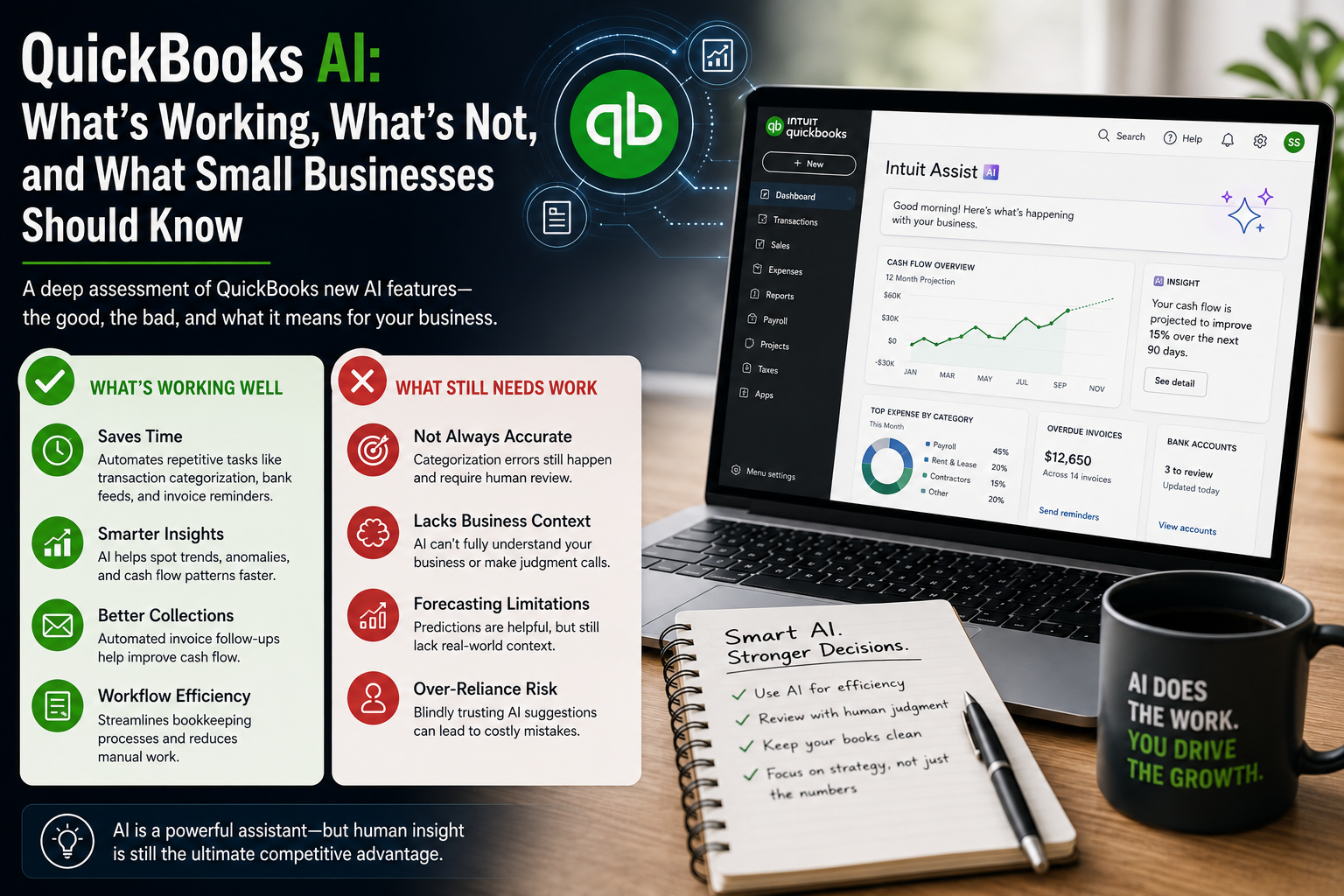

Artificial intelligence is becoming one of the biggest shifts the accounting software industry has seen in years.
QuickBooks has aggressively expanded its AI functionality through:
- Intuit Assist,
- AI-powered bookkeeping tools,
- predictive financial insights,
- automated workflows,
- anomaly detection,
- and intelligent transaction categorization.
On the surface, the message sounds compelling:
AI will save time, automate accounting, improve forecasting, and simplify financial management for small businesses.
And in some ways, it already does.
But after looking closely at QuickBooks’ newest AI features—and evaluating how they function in real-world accounting environments—the reality is far more nuanced than the marketing suggests.
Some tools are genuinely improving operational efficiency.
Others still create accounting risks, workflow frustrations, and accuracy concerns that small businesses should not ignore.
The articles published on Your Accounting Service Blog Posts often focus on:
- financial visibility,
- operational systems,
- forecasting,
- KPI management,
- cash flow,
- and strategic financial decision-making.
This article complements those topics by evaluating a rapidly growing question many businesses are now asking:
Can AI actually improve accounting operations—or is the technology moving faster than practical business reality?
The answer depends entirely on how the software is being used.
The Biggest Misconception About QuickBooks AI
One of the biggest misconceptions right now is that QuickBooks AI is becoming a fully autonomous accounting system.
It is not.
At least not yet.
What QuickBooks is really building is a layer of intelligent workflow assistance on top of traditional bookkeeping automation.
That distinction matters.
Most of the current AI tools are strongest when:
- processes are repetitive,
- bookkeeping structures are already clean,
- workflows are standardized,
- and humans are still reviewing the output.
The problems begin when businesses assume the AI understands accounting context at the same level an experienced bookkeeper, accountant, or CFO would.
Accounting is not just data entry.
It involves:
- judgment,
- interpretation,
- compliance,
- operational understanding,
- and strategic decision-making.
AI can accelerate workflows.
It still struggles to replace accounting expertise.
Where QuickBooks AI Is Actually Working Well
1. Administrative Workload Reduction
This is probably the single biggest area where QuickBooks AI is already providing real value.
For many small businesses, bookkeeping friction is not caused by complex accounting issues.
It comes from repetitive administrative work such as:
- categorizing transactions,
- uploading receipts,
- matching bank feeds,
- sending invoice reminders,
- and organizing expenses.
QuickBooks AI is increasingly effective at reducing those repetitive tasks.
For example:
- receipt capture has improved,
- recurring vendor recognition is more accurate,
- and transaction suggestions are faster than previous versions.
For service businesses with relatively straightforward accounting structures, this can save meaningful time every month.
The important point:
the value is operational efficiency—not autonomous accounting.
That distinction is where many businesses misunderstand the technology.
2. Invoice Follow-Up Automation Is Surprisingly Useful
One feature that deserves more credit is the AI-assisted invoice reminder system.
Collections are one of the most overlooked operational problems in small business.
Many owners delay follow-up because:
- it feels uncomfortable,
- it gets forgotten,
- or they are overwhelmed operationally.
QuickBooks AI now helps automate portions of that communication process through:
- reminder drafting,
- timing suggestions,
- and follow-up prompts.
This is one of the best examples of AI being applied appropriately.
The workflow is:
- repetitive,
- predictable,
- rules-based,
- and operationally important.
That is exactly the type of task current AI systems handle well.
For businesses struggling with receivables management, this feature alone can improve:
- cash flow consistency,
- collection timing,
- and operational discipline.
3. Financial Pattern Recognition Has Real Potential
One of the more promising developments inside QuickBooks AI is anomaly and trend detection.
The software is becoming better at identifying:
- unusual spending behavior,
- inconsistent expense activity,
- duplicate transaction risks,
- and abnormal account fluctuations.
This is important because many financial problems begin quietly.
Operational inefficiencies often appear in financial data long before leadership notices them operationally.
Examples include:
- rising software costs,
- shrinking margins,
- payroll drift,
- unusual vendor activity,
- or declining cash conversion speed.
Historically, identifying these issues required:
- regular financial reviews,
- strong bookkeeping oversight,
- and experienced financial analysis.
AI pattern recognition could eventually become one of the most valuable operational accounting tools available to small businesses.
But there is still an important limitation:
AI can identify patterns.
It cannot fully interpret business context.
4. QuickBooks AI Works Best in Clean Accounting Environments
This is one of the most important realities businesses need to understand before enabling heavy automation.
QuickBooks AI performs dramatically better when:
- charts of accounts are organized,
- vendor structures are clean,
- reconciliations are current,
- bookkeeping is consistent,
- and financial workflows already exist.
In other words:
AI amplifies system quality.
Businesses with strong accounting systems usually see better AI results.
Businesses with messy books often experience:
- incorrect categorizations,
- duplicate logic,
- inconsistent suggestions,
- and unreliable reporting.
This creates a dangerous misconception:
many businesses assume AI will fix bad bookkeeping.
In reality, poor bookkeeping structures often produce poor AI output.
The software becomes more efficient only after the accounting foundation is stable.
Where QuickBooks AI Still Struggles
1. Transaction Categorization Still Requires Human Oversight
This is probably the most important operational weakness right now.
QuickBooks AI categorization has improved—but it is still far from fully reliable in many real-world environments.
The system struggles when:
- vendors change names,
- expenses vary across departments,
- transactions overlap categories,
- or businesses have more complex operational structures.
For example:
A marketing expense could easily be categorized incorrectly between:
- advertising,
- software,
- contractors,
- subscriptions,
- or operational expenses
depending on how the vendor appears in the bank feed.
That may seem minor.
But repeated categorization errors can distort:
- profitability analysis,
- forecasting,
- tax preparation,
- KPI tracking,
- and financial decision-making.
This is where many businesses become overconfident.
The AI suggestions often “look right” at a glance—even when they are operationally inaccurate.
That creates hidden reporting risks.
2. Forecasting Is Helpful — But Still Limited
QuickBooks AI forecasting tools are improving.
The software is becoming better at:
- identifying historical trends,
- projecting recurring patterns,
- and visualizing cash flow timing.
For small businesses that previously had no forecasting visibility at all, this is a meaningful improvement.
But forecasting still has major limitations because business performance is not purely mathematical.
AI struggles to fully understand:
- operational disruptions,
- hiring decisions,
- pricing strategy,
- customer behavior changes,
- market shifts,
- or economic volatility.
Forecasting software can assist planning.
It cannot replace strategic business judgment.
This is especially important for:
- growing businesses,
- seasonal companies,
- service firms,
- and businesses with inconsistent revenue cycles.
The forecasts become less reliable when operational complexity increases.
3. AI Recommendations Sometimes Create “False Confidence”
This is one of the more dangerous long-term risks with AI accounting software.
When software becomes more conversational and polished, users naturally assume the recommendations are more intelligent than they may actually be.
The interface creates confidence.
But confidence is not always accuracy.
This is particularly risky for business owners without strong accounting knowledge because:
- suggested categorizations,
- AI-generated summaries,
- and financial prompts
can appear authoritative even when underlying assumptions are flawed.
AI is very good at sounding confident.
That does not mean it fully understands the accounting context.
Businesses still need:
- reconciliations,
- human review,
- accounting oversight,
- and financial interpretation.
4. Some Features Feel More Like “AI Branding” Than AI Innovation
This is something many accountants and bookkeepers are quietly discussing.
Not every “AI feature” inside QuickBooks is truly revolutionary.
In many cases, existing:
- automation tools,
- OCR systems,
- bank rules,
- and workflow prompts
have simply been repackaged with AI terminology.
That does not necessarily make the tools useless.
But there is an important difference between:
- workflow automation,
and - genuine accounting intelligence.
QuickBooks marketing occasionally blurs that line.
This creates unrealistic expectations about what the software can actually do autonomously.
What QuickBooks AI Still Cannot Replace
Despite rapid improvements, QuickBooks AI still struggles with areas requiring:
- accounting judgment,
- strategic interpretation,
- tax understanding,
- industry nuance,
- and operational decision-making.
For example:
AI still cannot reliably determine:
- whether a transaction should be capitalized,
- whether an accrual adjustment is appropriate,
- whether margins indicate operational inefficiency,
- or whether financial trends justify strategic changes.
Those decisions require business context.
And business context is where experienced advisors still create enormous value.
This is why the future of accounting is likely not:
“AI replacing accountants.”
The more realistic future is:
AI reducing repetitive processing while accountants focus more heavily on:
- advisory services,
- financial analysis,
- operational guidance,
- and strategic planning.
What Small Businesses Should Actually Do Right Now
For most businesses, the smartest approach is balanced adoption.
Use QuickBooks AI For:
- repetitive bookkeeping workflows,
- receipt processing,
- invoice reminders,
- transaction matching,
- administrative efficiency,
- and financial visibility support.
Do NOT Fully Rely on AI For:
- tax-sensitive accounting decisions,
- financial strategy,
- forecasting assumptions,
- complex categorizations,
- or final financial review.
The businesses benefiting most from AI right now are usually the businesses already operating with:
- strong bookkeeping systems,
- clean financial data,
- operational discipline,
- and professional financial oversight.
AI works best as a support tool—not a replacement for accounting structure.
The Bigger Operational Shift Happening in Accounting
The most important change may not actually be the AI itself.
It is the shift in how accounting work is evolving.
As automation improves:
- manual data entry matters less,
- workflow management matters more,
- operational analysis becomes more valuable,
- and financial interpretation becomes increasingly important.
Businesses will likely need:
less transactional bookkeeping,
and more financial guidance.
That shift aligns closely with many of the themes already discussed throughout Your Accounting Service Blog Posts:
- operational visibility,
- KPI systems,
- forecasting,
- financial strategy,
- and scalable financial management.
AI may automate portions of accounting.
But businesses still need clarity, interpretation, and strategic decision-making.
And those are still very human functions.
References
- https://www.intuit.com/intuitassist/
- https://quickbooks.intuit.com/global/ai-agents/accounting/
- https://quickbooks.intuit.com/learn-support/en-us/help-article/accounting-bookkeeping/overview-agents-quickbooks-online/L9irCAtK4_US_en_US
- https://quickbooks.intuit.com/learn-support/en-us/help-article/bank-transactions/accounting-agent-features/L6pl9rv94_US_en_US
- https://quickbooks.intuit.com/r/innovation/intuit-assist-for-quickbooks/
- https://quickbooks.intuit.com/r/bookkeeping/ai-bookkeeping-benefits/
- https://quickbooks.intuit.com/r/product-update/whats-new-quickbooks-online-june-2025/
- https://www.reddit.com/r/Bookkeeping/comments/1m9rtdt/qb_ai_does_anyone_actually_like_it/
- https://www.reddit.com/r/Accounting/comments/1kumdkq/people_who_say_ai_will_replace_accountants_are/